
Most Viewed Articles
- Blogs >
Principal Components Analysis
Using census dataset to find out the Principal Component Analysis(PCA). 
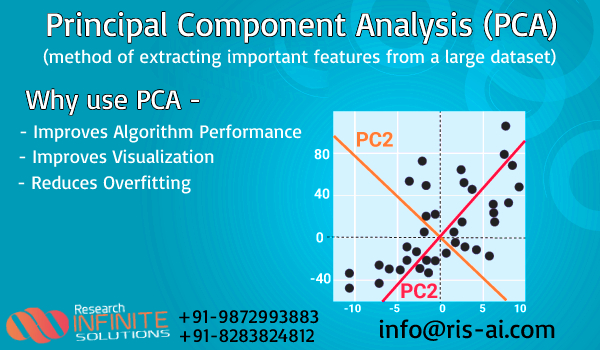
Principal Component Analysis is a technique to standardize the data and aims at reducing a large set of variables to a small set and that small set contains most of the information in the large set.
In the above content we've applied operations on dataset and then we've encoded our dataset according to the needs of the PCA .
Before performing PCA we've standarized the dataset and then we've applied PCA in the datatset after that we've done plotting on the dataset through PCA.
PCA(Principle Components Analysis) It is used to represent multivariate data table as smaller set of variables in order to observe trends,clusters and outlier's.
Import required libraries and dataset.
- In the first library we've taken pandas, they are used to read the dataset.
- In the second library we've taken numpy , they are used for working on an array.
- In the third library we've taken matplotlib, they are used for plotting the graph for a dataset.
- We've loaded csv file with the help of pandas.
We've taken head command to represent first five values in the dataset. It has taken values from 0 because of default command.
import pandas as pd
import numpy as np
import matplotlib.pyplot as plt
df=pd.read_csv("2014-aps-employee-census-5-point-dataset.csv")
print(df.head())
                                AS    q1                q2@  \
0  Large (1,001 or more employees)  Male     40 to 54 years
1  Large (1,001 or more employees)  Male     Under 40 years
2  Large (1,001 or more employees)  Male     Under 40 years
3  Large (1,001 or more employees)
4  Large (1,001 or more employees)  Male  55 years or older

                    q6@            q18a            q18b   q18c  \
0  Trainee/Graduate/APS           Agree           Agree  Agree
1  Trainee/Graduate/APS           Agree           Agree  Agree
2  Trainee/Graduate/APS           Agree  Strongly agree  Agree
3  Trainee/Graduate/APS  Strongly agree           Agree  Agree
4  Trainee/Graduate/APS           Agree  Strongly agree  Agree

                         q18d                        q18e  \
0                       Agree  Neither agree nor disagree
1  Neither agree nor disagree  Neither agree nor disagree
2  Neither agree nor disagree           Strongly disagree
3                       Agree                       Agree
4                       Agree                       Agree

                         q18f  ...                        q79d  \
0  Neither agree nor disagree  ...  Neither agree nor disagree
1  Neither agree nor disagree  ...  Neither agree nor disagree
2           Strongly disagree  ...  Neither agree nor disagree
3                       Agree  ...  Neither agree nor disagree
4                       Agree  ...                    Disagree

                         q79e  \
0  Neither agree nor disagree
1                       Agree
2                       Agree
3                    Disagree
4                    Disagree

                                                 q80 q81a.1 q81b.1 q81c.1  \
0                                                 No
1  Not applicable (i.e. you did not experience pr...
2                                                 No
3                                                 No
4                                                 No

  q81d.1 q81e.1 q81f.1 q81g.1
0
1
2
3
4

[5 rows x 225 columns]
Using shape and Describe method to find out the shape and description of the dataset. 
These methods are showing how many values are there in a dataset and how much frequency is there, how many unique values are there and what is the shape of the dataset.
And what values are there on the top of the dataset.
print("shape of dataset:",df.shape)
print("\n Dataset description:\n",df.describe())
shape of dataset: (99392, 225)

 Dataset description:
                                      AS      q1             q2@  \
count                             99392   99392           99392
unique                                3       4               4
top     Large (1,001 or more employees)  Female  40 to 54 years
freq                              86884   56250           42924

                         q6@   q18a   q18b   q18c   q18d   q18e   q18f  ...  \
count                  99392  99392  99392  99392  99392  99392  99392  ...
unique                     4      6      6      6      6      6      6  ...
top     Trainee/Graduate/APS  Agree  Agree  Agree  Agree  Agree  Agree  ...
freq                   67630  55703  45573  52271  48549  43131  51448  ...

         q79d   q79e                                                q80  \
count   99392  99392                                              99392
unique      6      6                                                  5
top     Agree  Agree  Not applicable (i.e. you did not experience pr...
freq    45745  43011                                              41766

       q81a.1 q81b.1 q81c.1 q81d.1 q81e.1 q81f.1 q81g.1
count   99392  99392  99392  99392  99392  99392  99392
unique      2      2      2      2      2      2      2
top
freq    98934  99260  98710  98428  99231  98785  99105

[4 rows x 225 columns]
Using columns and unique method for finding number of columns and unique values in dataset. 
Here we're showing about number of coloums present in the dataset and also how many unique values are present in the dataset.
With the help of unique command we're showing how many unique values are present in the particular column.
print("Columns name:",df.columns)
print("\nUnique values in column 'AS':",np.unique(df['AS']))
Columns name: Index(['AS', 'q1', 'q2@', 'q6@', 'q18a', 'q18b', 'q18c', 'q18d', 'q18e',
       'q18f',
       ...
       'q79d', 'q79e', 'q80', 'q81a.1', 'q81b.1', 'q81c.1', 'q81d.1', 'q81e.1',
       'q81f.1', 'q81g.1'],
      dtype='object', length=225)

Unique values in column 'AS': ['Large (1,001 or more employees)' 'Medium (251 to 1,000 employees)'
 'Small (Less than 250 employees)']
print(np.unique(df['q2@']))
[' ' '40 to 54 years' '55 years or older' 'Under 40 years']
Cleaning of the dataset. 
With the help of isnull method we're finding out the null values that are present in our dataset.
df.isnull().sum()
AS        0
q1        0
q2@       0
q6@       0
q18a      0
         ..
q81c.1    0
q81d.1    0
q81e.1    0
q81f.1    0
q81g.1    0
Length: 225, dtype: int64
Using info method to find out the information about the dataset regarding range index,columns,datatypes,memory usage. 
print(df.info())
<class 'pandas.core.frame.DataFrame'>
RangeIndex: 99392 entries, 0 to 99391
Columns: 225 entries, AS to q81g.1
dtypes: object(225)
memory usage: 170.6+ MB
None
Using value_count method 
With the help of this command we're finding the frequency of each values present in our particular columns of datatset.
df["AS"].value_counts()
Large (1,001 or more employees)    86884
Medium (251 to 1,000 employees)     8884
Small (Less than 250 employees)     3624
Name: AS, dtype: int64
Using dropNa method
We're using this method to clean the data with the help of dropna to remove all null values.
df = df.dropna()
print(df)
                                    AS      q1                q2@  \
0      Large (1,001 or more employees)    Male     40 to 54 years
1      Large (1,001 or more employees)    Male     Under 40 years
2      Large (1,001 or more employees)    Male     Under 40 years
3      Large (1,001 or more employees)
4      Large (1,001 or more employees)    Male  55 years or older
...                                ...     ...                ...
99387  Medium (251 to 1,000 employees)  Female     40 to 54 years
99388  Medium (251 to 1,000 employees)    Male  55 years or older
99389  Medium (251 to 1,000 employees)    Male  55 years or older
99390  Medium (251 to 1,000 employees)    Male  55 years or older
99391  Medium (251 to 1,000 employees)  Female  55 years or older

                        q6@            q18a               q18b  \
0      Trainee/Graduate/APS           Agree              Agree
1      Trainee/Graduate/APS           Agree              Agree
2      Trainee/Graduate/APS           Agree     Strongly agree
3      Trainee/Graduate/APS  Strongly agree              Agree
4      Trainee/Graduate/APS           Agree     Strongly agree
...                     ...             ...                ...
99387  Trainee/Graduate/APS           Agree              Agree
99388  Trainee/Graduate/APS  Strongly agree  Strongly disagree
99389  Trainee/Graduate/APS           Agree              Agree
99390  Trainee/Graduate/APS           Agree              Agree
99391  Trainee/Graduate/APS           Agree     Strongly agree

                    q18c                        q18d  \
0                  Agree                       Agree
1                  Agree  Neither agree nor disagree
2                  Agree  Neither agree nor disagree
3                  Agree                       Agree
4                  Agree                       Agree
...                  ...                         ...
99387              Agree                       Agree
99388  Strongly disagree           Strongly disagree
99389              Agree                       Agree
99390              Agree                       Agree
99391     Strongly agree              Strongly agree

                             q18e                        q18f  ...  \
0      Neither agree nor disagree  Neither agree nor disagree  ...
1      Neither agree nor disagree  Neither agree nor disagree  ...
2               Strongly disagree           Strongly disagree  ...
3                           Agree                       Agree  ...
4                           Agree                       Agree  ...
...                           ...                         ...  ...
99387                       Agree                       Agree  ...
99388           Strongly disagree                       Agree  ...
99389  Neither agree nor disagree                    Disagree  ...
99390                       Agree                    Disagree  ...
99391                       Agree                    Disagree  ...

                             q79d                        q79e  \
0      Neither agree nor disagree  Neither agree nor disagree
1      Neither agree nor disagree                       Agree
2      Neither agree nor disagree                       Agree
3      Neither agree nor disagree                    Disagree
4                        Disagree                    Disagree
...                           ...                         ...
99387
99388
99389
99390
99391

                                                     q80 q81a.1 q81b.1 q81c.1  \
0                                                     No
1      Not applicable (i.e. you did not experience pr...
2                                                     No
3                                                     No
4                                                     No
...                                                  ...    ...    ...    ...
99387
99388
99389
99390
99391

      q81d.1 q81e.1 q81f.1 q81g.1
0
1
2
3
4
...      ...    ...    ...    ...
99387
99388
99389
99390
99391

[99392 rows x 225 columns]
Using label encoder
Label encoder: It converts categorical values to numeric values. LabelEncoder encode labels with a value between 0 and n_classes-1 where n is the number of distinct labels.
from sklearn.preprocessing import LabelEncoder
coll=df.columns
num_coll=len(coll)
print("Total columns in dataset:",num_coll)
Total columns in dataset: 225
Using multicolumn label encoder 
With the help of multi label encoder we're converting large amount of categorical data into numerical data for multiple columns of the dataset.
class MultiColumnLabelEncoder:
    def __init__(self,columns = None):
        self.columns = columns
    def fit(self,X,y=None):
        return self
    def transform(self,X):
        output = X.copy()
        if self.columns is not None:
            for col in self.columns:
                output[col] = LabelEncoder().fit_transform(output[col])
        else:
            for colname,col in output.iteritems():
                output[colname] = LabelEncoder().fit_transform(col)
        return output
    def fit_transform(self,X,y=None):
        return self.fit(X,y).transform(X)
encode_df=MultiColumnLabelEncoder(columns = coll).fit_transform(df)
Train and Test of the dataset 
Here we're using train and test for the datatset. So that before performing our operation on PCA we test and train our dataset.
X = encode_df.iloc[:, 0:100].values
y = encode_df.iloc[:, 100:].values

from sklearn.model_selection import train_test_split
X_train, X_test, y_train, y_test = train_test_split(X, y, test_size = 0.2, random_state = 0)
Standardization 
Standardiaztion means converting or rescaling large amount of data or small amount of data so that result are not biased or large amount of data is not dominant on small amount of data and hence result can be biased . so to correct this thing we use standardization.
from sklearn.preprocessing import StandardScaler
scaler=StandardScaler()
scaler.fit(encode_df)
scaled_data=scaler.transform(encode_df)
print(scaled_data)
[[-0.35512512  1.08217509 -0.86199097 ... -0.04027998 -0.07838787
  -0.05381374]
 [-0.35512512  1.08217509  1.16639595 ... -0.04027998 -0.07838787
  -0.05381374]
 [-0.35512512  1.08217509  1.16639595 ... -0.04027998 -0.07838787
  -0.05381374]
 ...
 [ 1.83286125  1.08217509  0.15220249 ... -0.04027998 -0.07838787
  -0.05381374]
 [ 1.83286125  1.08217509  0.15220249 ... -0.04027998 -0.07838787
  -0.05381374]
 [ 1.83286125 -0.78784032  0.15220249 ... -0.04027998 -0.07838787
  -0.05381374]]
Using PCA
It is used to represent multivariate data table as smaller set of variables in order to observe trends,cluster's and outliers.
- We use PCA to convert 3 independent features to 2 independent features using vector space.
- Here difference should be minimal so we use standarization .
from sklearn.decomposition import PCA
pca = PCA(n_components =100)
pca.fit(scaled_data)
X_pca = pca.transform(scaled_data)
explained_variance = pca.explained_variance_ratio_
print("PCA variance ratio:\n ",explained_variance)
PCA variance ratio:
  [0.17174386 0.05400343 0.04285115 0.03413928 0.02813929 0.02192731
 0.01637397 0.01541781 0.01355456 0.01194664 0.01162375 0.01075132
 0.00993616 0.00955814 0.00926424 0.00907456 0.00868036 0.00862437
 0.00857389 0.00801754 0.00693549 0.00690604 0.00672259 0.00628069
 0.00578766 0.00570613 0.00564489 0.00542409 0.00536122 0.00515135
 0.00510966 0.00508185 0.00487065 0.00480339 0.00469909 0.00466639
 0.00457426 0.00455165 0.00451562 0.00446899 0.00440665 0.004346
 0.00432109 0.00428343 0.00423037 0.00415517 0.00411799 0.00409009
 0.00406203 0.0040447  0.00392605 0.00388362 0.00386713 0.00380245
 0.00373605 0.00370093 0.00364178 0.00359485 0.00351624 0.00348304
 0.00343211 0.00340265 0.00334397 0.00331924 0.00330868 0.0032896
 0.00326933 0.00322748 0.00319879 0.00318379 0.00310807 0.00308975
 0.00306869 0.00301716 0.00298357 0.00298094 0.00294148 0.00289031
 0.00284248 0.00279262 0.00276843 0.00272978 0.00271601 0.00268968
 0.00268609 0.00265651 0.00260367 0.00260165 0.00256548 0.00253245
 0.00251968 0.00246755 0.00245905 0.00244337 0.00242123 0.00239962
 0.00235046 0.00234205 0.00231747 0.00231347]
print(X_pca)
[[-1.59152612  0.55564691 -0.70495291 ...  0.77915177  1.08884638
   0.78325715]
 [-2.57328202  1.4814192  -1.7046726  ...  0.17181242 -0.03189908
  -1.2864775 ]
 [-3.97356152  0.91220517  5.74592169 ... -0.28159834  0.96923543
  -0.27102818]
 ...
 [13.99032327  1.43328238 -1.05774149 ... -0.68599246  0.178349
  -0.07620442]
 [13.25045555  0.87868275 -0.68725882 ... -1.1036088  -0.38240104
   0.46014404]
 [ 8.81093543  5.91687096  4.69821008 ... -1.16038284 -1.09898136
  -0.7022699 ]]
print("X_pca shape:",X_pca.shape)
print("Standard scaler shape:",scaled_data.shape)
X_pca shape: (99392, 100)
Standard scaler shape: (99392, 225)
Using explained_varianceratio.cumsum
It returns sum of vector of the variance explained by each dimension.
pca.explained_variance_ratio_.cumsum()
array([0.17174386, 0.22574729, 0.26859844, 0.30273772, 0.33087701,
       0.35280432, 0.36917829, 0.38459611, 0.39815067, 0.41009731,
       0.42172106, 0.43247237, 0.44240853, 0.45196667, 0.46123091,
       0.47030547, 0.47898583, 0.4876102 , 0.49618408, 0.50420163,
       0.51113711, 0.51804315, 0.52476574, 0.53104643, 0.53683408,
       0.54254021, 0.5481851 , 0.55360919, 0.5589704 , 0.56412175,
       0.56923141, 0.57431326, 0.57918391, 0.5839873 , 0.5886864 ,
       0.59335279, 0.59792705, 0.6024787 , 0.60699431, 0.6114633 ,
       0.61586995, 0.62021594, 0.62453703, 0.62882047, 0.63305084,
       0.63720601, 0.641324  , 0.64541409, 0.64947612, 0.65352082,
       0.65744687, 0.66133049, 0.66519762, 0.66900008, 0.67273612,
       0.67643706, 0.68007884, 0.68367369, 0.68718993, 0.69067297,
       0.69410508, 0.69750774, 0.7008517 , 0.70417095, 0.70747963,
       0.71076923, 0.71403856, 0.71726604, 0.72046482, 0.72364861,
       0.72675669, 0.72984644, 0.73291513, 0.73593228, 0.73891585,
       0.74189679, 0.74483826, 0.74772857, 0.75057106, 0.75336368,
       0.75613211, 0.75886189, 0.7615779 , 0.76426758, 0.76695367,
       0.76961018, 0.77221385, 0.7748155 , 0.77738099, 0.77991344,
       0.78243312, 0.78490068, 0.78735973, 0.7898031 , 0.79222433,
       0.79462395, 0.79697441, 0.79931646, 0.80163393, 0.80394741])
print(pca.components_)
[[-4.99442165e-06 -5.25975613e-03 -2.13945274e-03 ... -5.64910048e-03
  -8.38891747e-03 -4.89141221e-03]
 [ 2.78183433e-03  1.45460517e-02 -1.00834039e-02 ...  2.00351858e-02
   2.42798487e-02  9.76354200e-03]
 [ 1.74241577e-02  6.91796896e-04  8.58904232e-03 ... -7.00410370e-03
  -1.64223006e-02 -1.08194920e-02]
 ...
 [ 4.73681228e-02  1.63870006e-02 -4.82537985e-02 ...  1.81208672e-02
   2.04451962e-01  8.95866809e-03]
 [ 2.75000546e-02 -1.15534197e-02  1.62820191e-02 ... -8.16662086e-03
  -5.62814675e-02 -9.40465919e-03]
 [-9.25218962e-03 -7.08683049e-03 -2.61927038e-02 ...  3.14174560e-02
   2.06966563e-01  4.55041143e-02]]
principal_Df = pd.DataFrame(data = X_pca)
print("Principle Component of n(columns)\n",principal_Df.tail())
Principle Component of n(columns)
               0         1         2         3         4         5         6   \
99387  13.813840 -0.899497 -0.583618  1.036175 -4.244118  3.485645 -2.109940
99388  10.334663  5.139781  1.020396  0.804072 -2.202810  3.686753  0.766625
99389  13.990323  1.433283 -1.057741  1.627129 -3.713760  3.764278 -1.170729
99390  13.250456  0.878683 -0.687258  1.424517 -2.945365  3.944510 -1.687646
99391   8.810935  5.916871  4.698210 -0.963108 -4.863728  1.608598 -0.110916

             7         8         9   ...        90        91        92  \
99387 -2.076125  0.755177 -2.453250  ...  1.128403 -1.385875  1.708233
99388  0.143015 -0.709548 -5.805359  ...  0.414398  0.293454  0.563784
99389 -0.104195  0.116808 -2.935770  ...  0.916435 -1.083431  1.722635
99390 -1.452443  0.301982 -2.944357  ... -0.303025 -0.716382  0.276747
99391 -1.242712  1.170820 -5.558526  ...  0.004581 -0.833099  0.366975

             93        94        95        96        97        98        99
99387  0.253080  1.007792 -0.487912 -0.022340  1.037823 -0.604213  0.730468
99388  0.330160  0.633721 -0.246346  0.018870  0.691985 -0.224734 -0.467560
99389  0.030010  0.739100 -0.335656 -0.260550  0.110084 -1.239035  0.690112
99390  0.922285  0.119716 -0.273016 -0.294379  0.768032 -0.509641  0.776732
99391  0.531050  0.003078 -1.255948 -0.370940  1.612783 -0.488076 -0.678922

[5 rows x 100 columns]
Plotting principal components of analysis(PCA) in 2-D. 
Here we've plotted a graph with the help of PCA We've defined three colors to the graph.
- Purple
- Blue
- Yellow We've shown that there are three category:
- Large (1,001 or more employees)
- Medium (251 to 1,000 employees)
- 'Small (Less than 250 employees)
plt.figure(figsize=(15,10))
plt.scatter(X_pca[:,0],X_pca[:,1],c=encode_df['AS'])
plt.xlabel('PC1 "First Principal Component"')
plt.ylabel('PC2 "Second Principal Component"')
plt.colorbar();
plt.show()

Conclusion:
From the above content we learned about the the dataset what type of information does the dataset contain. What is there in the dataset and how PCA will be used in the dataset and how plotting will be done in the dataset and learned how dataset is standardized according to the PCA and came to know how many null values are there in the dataset and how to remove them with the help of dropna method. 
Resources You Will Ever Need







Popular Searches
- Thesis Services
- Thesis Writers Near me
- Ph.D Thesis Help
- M.Tech Thesis Help
- Thesis Assistance Online
- Thesis Help Chandigarh
- Thesis Writing Services
- Thesis Service Online
- Thesis Topics in Computer Science
- Online Thesis Writing Services
- Ph.D Research Topics in AI
- Thesis Guidance and Counselling
- Research Paper Writing Services
- Thesis Topics in Computer Science
- Brain Tumor Detection
- Brain Tumor Detection in Matlab
- Markov Chain
- Object Detection
- Employee Attrition Prediction
- Handwritten Character Recognition
- Gradient Descent with Nesterov Momentum
- Gender Age Detection with OpenCV
- Realtime Eye Blink Detection
- Pencil Sketch of a Photo
- Realtime Facial Expression Recognition
- Time Series Forecasting
- Face Comparison
- Credit Card Fraud Detection
- House Price Prediction
- House Budget Prediction
- Stock Prediction
- Email Spam Detection